

The Short Answer
A blog post should be as long as it takes to answer the reader’s question completely, with the answer placed where someone skimming finds it in seconds.
- Google says it has no preferred word count.
- Research on web reading finds people read only part of a typical page. They scan for their own question.
- For five estate-planning questions we checked in October 2026, the top articles ran from about 550 to 3,550 words. The middle was about 1,350.
- When someone says a post is too long, fix how fast readers find the answer before you cut what they need.
In this article
- Does Google prefer longer blog posts?
- Where the popular word-count rules come from
- How long are the articles that rank for estate-planning questions?
- How much of a blog post do readers actually read?
- How to find the ideal blog post length for your question
- What to do when someone says your blog post is too long
- FAQ
A client I work with asked me a fair question. Her new article ran over 2,000 words and she wondered was it that long for clicks? Many of her clients, she said, tune out around 500 words. Could we split it into a few shorter posts?
My AI system suggested a polite reply agreeing to split it into three.
I rolled my eyes and stopped it. She wasn’t wrong about her readers. But splitting it up was her fix, and my job is to find the best one.
So before I answered her, I checked two things: what Google actually says about length, and what’s known about how people read online. What I found was that her readers didn’t have a length problem. They had a finding-the-answer problem.
We kept the article as written and added a box at the top with the simple answer. One plain sentence, four bullets, and links that jump to each section. She approved the full piece the next morning.
Later that day I got curious about something else. If 500 words was the wrong limit, what was the right one? So we counted the words on the pages that actually rank for questions like hers. Here’s what I found, starting with Google.
Does Google Prefer Longer Blog Posts?
No, and Google says so in writing. In its own list of signs that a page was made for search engines instead of people, Google asks: “Are you writing to a particular word count because you’ve heard or read that Google has a preferred word count? (No, we don’t.)” That line sits on Google’s guide to creating helpful, reliable, people-first content, as of October 2026.
What Google asks instead is whether the page fully answers the question. Its self-check questions ask whether the content gives “a substantial, complete, or comprehensive description of the topic,” and whether someone will “leave feeling they’ve learned enough about a topic to help achieve their goal.” For one question, a full answer takes 600 words. For another, it takes 2,000.
Google’s John Mueller has been blunter about it. In a 2019 forum reply, he wrote that word count is not a ranking factor, as Search Engine Roundtable reported. In 2021 he said the number of words on a page “is not a quality factor, not a ranking factor,” according to Search Engine Journal. Even Backlinko’s study of 11.8 million Google results, which found the average top-10 page ran about 1,447 words, reported “no direct relationship between word count and rankings.”
Long articles can still rank. Google just doesn’t rank them for being long.
So I wondered: if Google doesn’t want a number, where did everyone’s numbers come from?
Where the Popular Word-Count Rules Come From
I went looking. Three of the most repeated numbers trace back to three very different places, and none of them measured what ranks for your clients’ questions.
A site’s own best posts. WordStream’s guide to blog length bases its answer on its own top posts, which average 2,700 to 3,000 words. That’s an honest look at what worked for that blog’s topics and readers. It tells you nothing about what works for your business.
A 2019 study of links and shares. Backlinko and BuzzSumo analyzed 912 million blog posts and found that posts over 3,000 words earned 77.2% more linking sites than posts under 1,000 words. Separately, posts of 1,000 to 2,000 words got 56.1% more social shares than posts under 1,000, with diminishing returns past 2,000. Those are two different comparisons, and they measure links and shares, not Google rankings. Long posts did pull more links in that data, fair enough. But the authors themselves said “it’s impossible to draw any firm conclusions” from it.
The 2,450-word number. Most guides credit it to a serpIQ study of about 20,000 keywords, as a content agency reported in 2018. We went looking for the original study and couldn’t find it. If a number gets repeated that much, someone should be able to point to the study.
Those numbers came from other people’s topics. I wanted to know what ranks for questions like my client’s.
How Long Are the Articles That Rank for Estate-Planning Questions?
So we counted. In October 2026 we searched five questions people bring to estate-planning lawyers, in Google’s U.S. results. For each one we took the top five article-style pages, skipping statutes, forms, forums, social posts and video, and counted the words in each article.
| Question | Shortest | Longest | Middle |
|---|---|---|---|
| What happens if you die without a will in Florida | about 850 | about 3,550 | about 1,500 |
| Estate planning without children | about 750 | about 2,400 | about 1,650 |
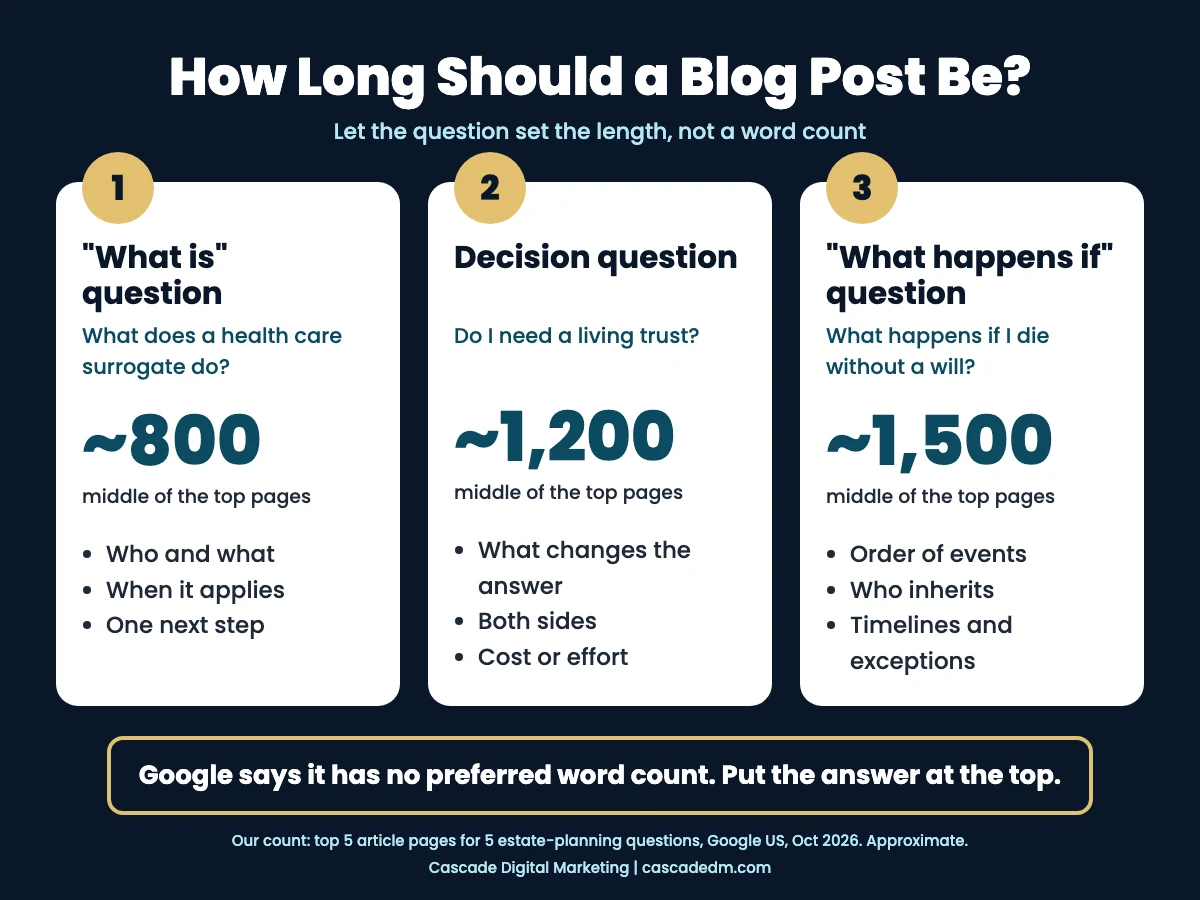
| Do I need a living trust | about 750 | about 1,550 | about 1,200 |
| How to choose a power of attorney | about 900 | about 1,800 | about 1,450 |
| Health care surrogate in Florida | about 550 | about 1,500 | about 800 |
Across all 25 pages, the articles ran from about 550 to 3,550 words, with the middle around 1,350. Only 3 of the 25 went past 2,300.
Here’s what surprised me. A 2,450-word article would have been longer than 24 of the 25 pages that rank. And in our count, none of the 25 came in under 500 words.
The narrow question, what a Florida health care surrogate is, ranked with the shortest pages. The broad ones, dying without a will and planning without children, had the longest. In our sample, the broader the question, the longer the pages that ranked for it.
There are limits to this. Five questions is a small sample, and it’s one snapshot in time. Our counts are approximate, because a few pages had some menu text counted. And the top results included banks, a hospital system and a legal-aid site, not just law firms.
So length tracks the question, at least in our sample. But that didn’t answer my client’s real worry. Do people actually read all those words?
How Much of a Blog Post Do Readers Actually Read?
Mostly, no. My client’s instinct about her readers matches the research. Nielsen Norman Group estimated in 2008 that people read about 20% of the words on an average web page, and 28% at most. That came from 25 people’s browsing in 2005, on pages that averaged about 600 words, so it isn’t a law for a 2,000-word legal article. It is a good picture of how people use the web. They skim.
The useful part is how they skim. NN/g describes a layer-cake pattern. Readers jump from heading to heading and read the body only where a heading matches what they came for. When headings are clear, NN/g calls it “by far the most effective way to scan pages.”
NN/g’s writing advice follows from that. Start with the most important information “so readers can get the main point, regardless of how much they read,” and consider a short list of key points up top.
That’s why we add a short answer box. A reader who only wants the 500-word version gets the answer first and can stop there. Someone planning their own estate can keep going, and the detail is still on the page.
How to Find the Ideal Blog Post Length for Your Question
Start with the kind of question, not a number. In our table, the shortest and longest rows lined up with the kind of question being asked.
- A narrow “what is” question, like what a health care surrogate does. The reader needs who, what, when it applies, and one next step. In our count, the top pages ran short, with the middle around 800 words.
- A decision question, like whether you need a living trust. The reader needs the conditions that change the answer, and both sides of it. The middle was around 1,200.
- A “what happens if” question, like dying without a will in Florida. The reader needs the order of events, who inherits, the timelines and the exceptions. The middle was around 1,500, and this question had the longest page in our sample, just over 3,500 words.
Treat those numbers as what ranked in a small sample, not as targets. To check your own question, run the same test we did:
- Search the exact question your client would type.
- Open the top five article-style results. Skip statutes, forms, forums, social posts and video.
- Count the words in each article.
- Use the range and the middle as context, not a target.
Matching the range won’t make an article rank. You have to answer the question better than those pages. So start your brief with the question and a list of what the reader must leave knowing. Then write until you’ve covered that list.
What to Do When Someone Says Your Blog Post Is Too Long
Listen first. The person saying “too long” may be telling you something true about the reader. “Make it shorter” is one fix, and often not the best one. Ask what the reader came for, and whether they can find it in the first few seconds. Make the answer easier to find before you cut anything.
Here’s the order I work in:
- Add a Short Answer box at the top. One plain sentence that answers the title question. Three to five bullets with the facts a skimmer needs. A label in your reader’s words. The box at the top of this article is the pattern. On legal topics, leave the conditions in (“in most cases,” “in Florida”) so the short version stays accurate.
- Write headings as the questions readers ask. Scanners read headings. A heading that matches their question is where they stop and read.
- Add links to each section on long pages. They let someone who arrives with one question jump straight to it. NN/g notes that jump links can become unnecessary when a page is written to draw readers down it, so treat them as a shortcut, not the main fix.
- Then cut what no reader needs. Repetition, setup paragraphs, background nobody asked for. Not the conditions, exceptions and next steps that someone planning their own situation needs.
What about AI answers? Google says that “specific optimization isn’t required for AI Overviews and AI Mode.” Add the box for your readers. Google doesn’t reward it.
That’s what we did for my client. She had a point about her readers, and the article got minimal edits. When a client says something true about their reader, it’s always worth listening. But the fix isn’t always the most obvious one.
If you want a second set of eyes on whether your firm’s articles answer the questions your clients actually ask, book a free strategy session with me.
FAQ
Should I split a long blog post into several shorter posts?
Usually not, if one question ties the content together. Splitting makes the reader hunt across several pages for one answer. Split when the parts answer different questions people search for separately, like what a health care surrogate is and how to choose a power of attorney. That’s our view, based on Google’s completeness test and NN/g’s advice to lead with the answer.
Is 500 words enough for a law firm blog post?
It can be, for a narrow question. In our October 2026 count, some of the top results for a Florida health care surrogate question ran about 550 to 800 words. It may not be enough for a “what happens if” question with conditions and exceptions. All five top pages we counted for dying without a will in Florida ran about 850 words or more.
Do AI Overviews prefer short answers?
Google says no special optimization is needed for AI Overviews or AI Mode. A page needs to be indexed and eligible to show in Google Search with a snippet. We add a short answer box because it helps readers find the answer, not because Google rewards it.


